Developer Health: Neck, Wrists, Eyes, and Staying Sane
Health problems from long coding sessions and how to prevent them. Posture, stretches, equipment, and mental health.
[!CAUTION] Medical disclaimer: This post provides general information only and is not a substitute for professional medical advice, diagnosis, or treatment. If you're experiencing health issues, consult a doctor or physical therapist.
Eight-plus hours a day in a chair, staring at a screen, typing on a keyboard, pushing a mouse around. That's the developer lifestyle, and none of it is good for your body.
Stiff neck. Tingling wrists. Blurry vision. Most people brush these off as "just part of the job" until the symptoms become chronic. Prevention beats treatment, but it's hard to act on that when you don't know what specifically to do.
Neck and Back
Why It Happens
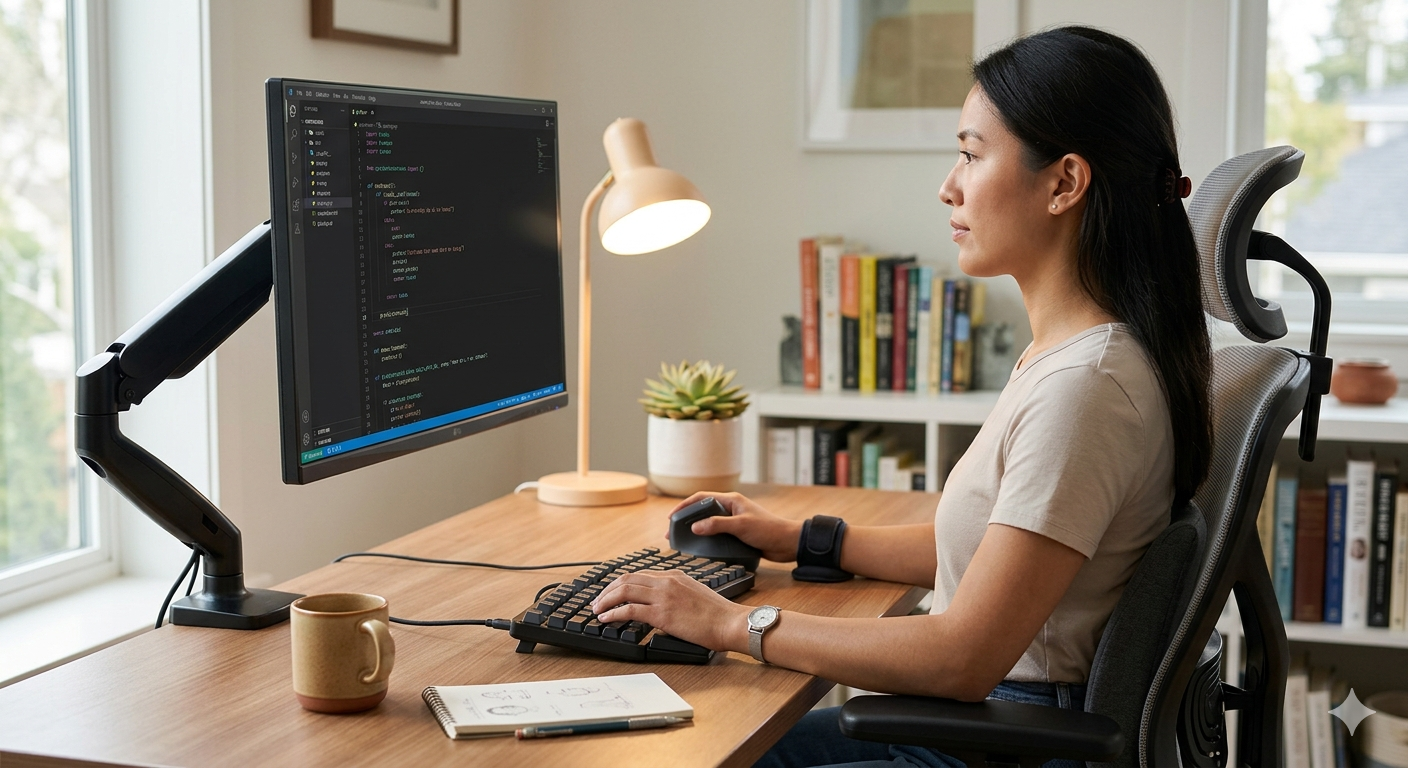
When your monitor sits below eye level, your head tilts forward. A slight tilt at first, but it gets worse as you focus on code. Your head weighs about 11 pounds. Tilt it forward 15 degrees and the load on your cervical spine jumps to roughly 27 pounds. At 45 degrees, nearly 50 pounds. Your neck muscles are holding that weight hour after hour.
Forward head posture isn't a medical condition on its own — it's a postural issue. But left unchecked, it leads to cervical disc problems, headaches, and shoulder pain. Your lower back takes a beating too. Research shows that sitting increases lumbar pressure by about 40% compared to standing.
Fixing Your Posture
More important than finding the "perfect posture" is changing positions frequently. Even a textbook posture causes muscle fatigue if you hold it for two hours straight.
That said, get the baseline right:
- Top of the monitor at or slightly below eye level — you look down with your eyes, not your neck
- Back against the chair, lumbar support touching your lower back
- Feet flat on the floor (use a footrest if they don't reach)
- Elbows at 90-110 degrees
Your Chair Matters
The single highest-ROI equipment investment is a good chair. Spending all day in a cheap office chair and your back will let you know. Chairs like the Herman Miller Aeron or Steelcase Leap are popular for a reason. If the price is too steep, even a used high-quality chair beats a new budget one.
What makes a good chair:
- Height adjustment
- 4D armrests (height, width, depth, angle)
- Lumbar support
- Tilt adjustment
- Backrest that reaches your shoulders
A monitor arm is also worth considering. It makes positioning the screen at the right height and distance much easier and frees up desk space.
Wrist Health
Carpal Tunnel Syndrome
The median nerve running through your wrist gets compressed. Symptoms include finger tingling, numbness, and in severe cases, difficulty gripping objects. Common among people who use keyboards and mice for extended periods.
Early on, shaking your hands provides relief. Ignore it long enough and surgery may be necessary. If your hands go numb while sleeping, that's a sign it's already progressed significantly.
Prevention
Keyboard position — Your wrists shouldn't be bent. Many people pop up the keyboard feet to create a tilt, but this forces the wrists into extension (bending backward). Keeping the keyboard flat or tilting the front edge slightly up (negative tilt) is better for your wrists.
Wrist rest — It's for resting between typing, not during typing. Pressing your wrists against a pad while actively typing increases pressure on the carpal tunnel.
Split keyboards — Keyboards like the Ergodox, Kinesis Advantage, or ZSA Moonlander let you position each half at shoulder width, reducing the unnatural inward rotation (pronation) of your wrists. There's an adaptation period, but the reduction in wrist strain is real.
Wrist Stretches
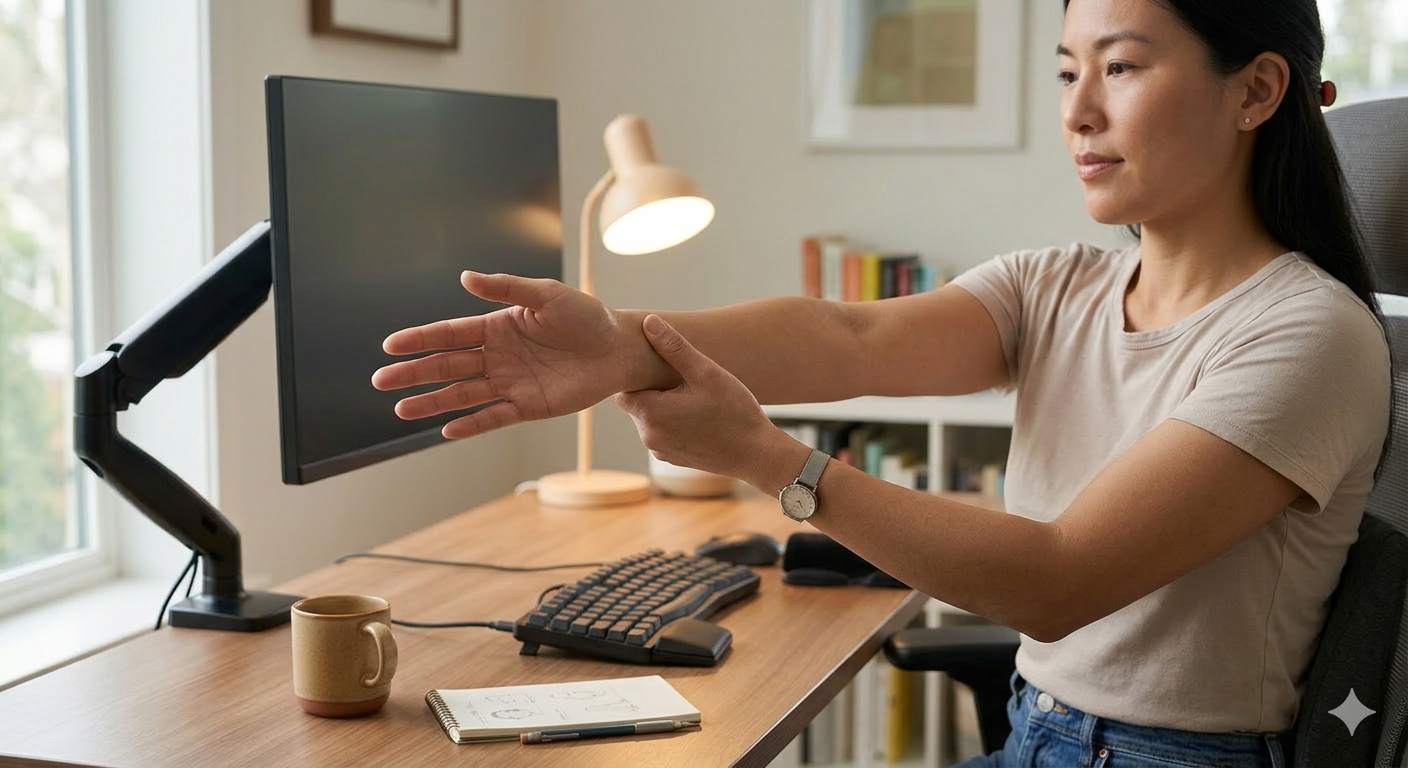
Do these every 30-60 minutes. Takes less than a minute.
Prayer stretch: Press your palms together in front of your chest, then push your elbows outward while lowering your hands toward your belly. Hold for 15 seconds when you feel the stretch in your inner wrists.
Finger spread: Extend your hand fully and spread your fingers as wide as possible, then make a tight fist. Repeat 10 times. Helps with circulation.
Ball squeeze: Squeeze a tennis ball or stress ball repeatedly. Strengthens the forearm muscles.
Eye Health
Computer Vision Syndrome (CVS)
More than 2 hours of screen time per day can trigger it — eye fatigue, dryness, headaches, blurred vision. Developers are well past the 2-hour mark.
When staring at a screen, your blink rate drops. Normal is 15-20 blinks per minute. Looking at a monitor, that falls to 5-7. That's a primary driver of dry eyes.
The 20-20-20 Rule
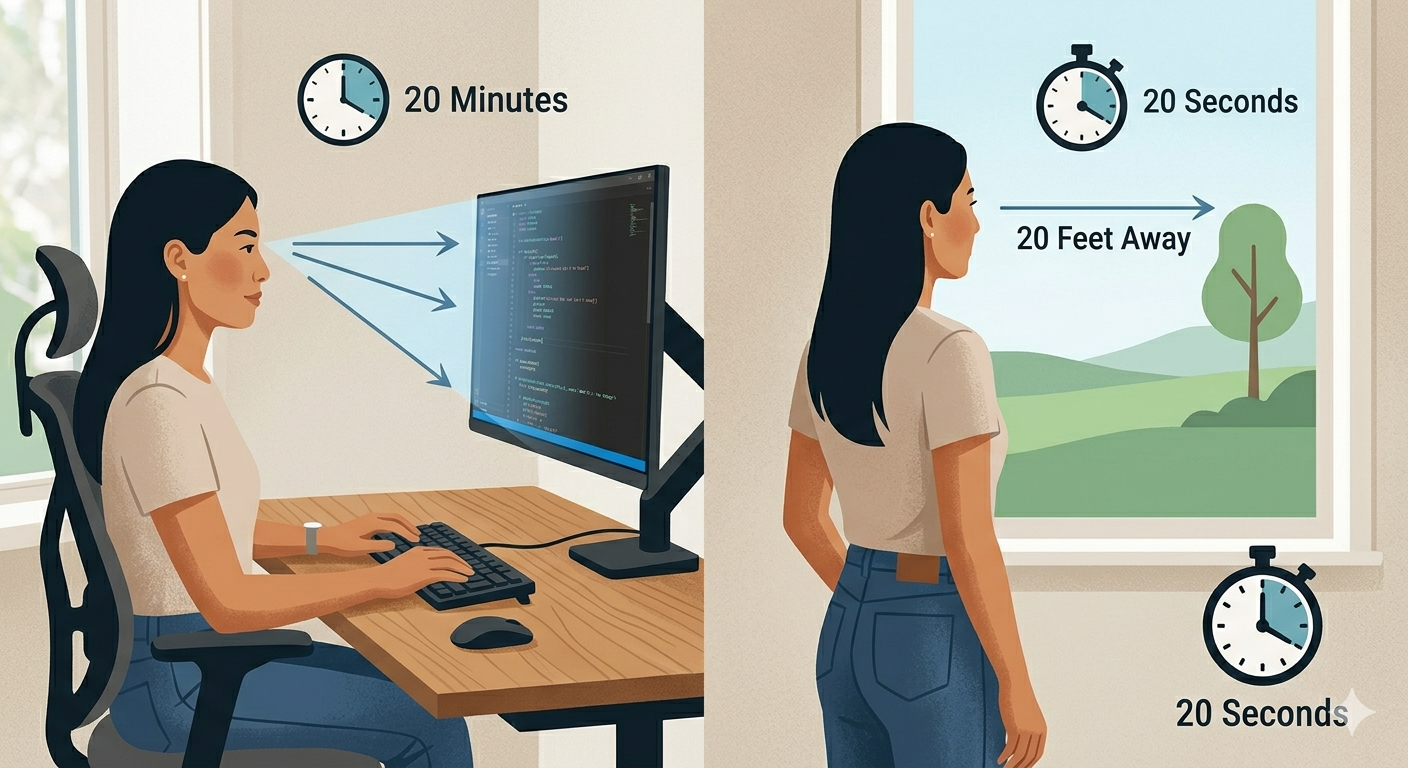
Every 20 minutes, look at something 20 feet (about 6 meters) away for 20 seconds. Simple, and it works. It relaxes the ciliary muscle that's been locked in near-focus mode.
The catch: when you're deep in code, 20 minutes vanishes. Set a timer. On macOS, apps like Time Out work well. On Windows, try Stretchly. They overlay a semi-transparent reminder on your screen.
Monitor Settings
Brightness — Match your surroundings. If the monitor looks like a sheet of white paper, it's about right. Brighter than the ambient environment causes eye strain.
Blue light — This one's debated. The American Academy of Ophthalmology says there isn't strong evidence that blue light filters protect eye health. But there is research suggesting that reducing blue light in the evening can improve sleep quality. Using dark mode at night is a reasonable choice.
Distance — About arm's length. Roughly 20-28 inches (50-70cm).
Font size — Coding with tiny fonts makes you unconsciously lean toward the screen. Set your IDE font to 14-16px. Making your editor font bigger doesn't make you a worse programmer.
Movement
Sitting Is the Problem
"Sitting is the new smoking" is an overstatement, but prolonged sitting does increase the risk of cardiovascular disease, diabetes, and musculoskeletal issues — multiple studies confirm this.
Even if you exercise 30 minutes a day, spending the remaining hours sitting can offset those benefits. What matters is getting up periodically. Once an hour, stand up. Get water, use the bathroom, or just stretch for a minute.
Standing Desks
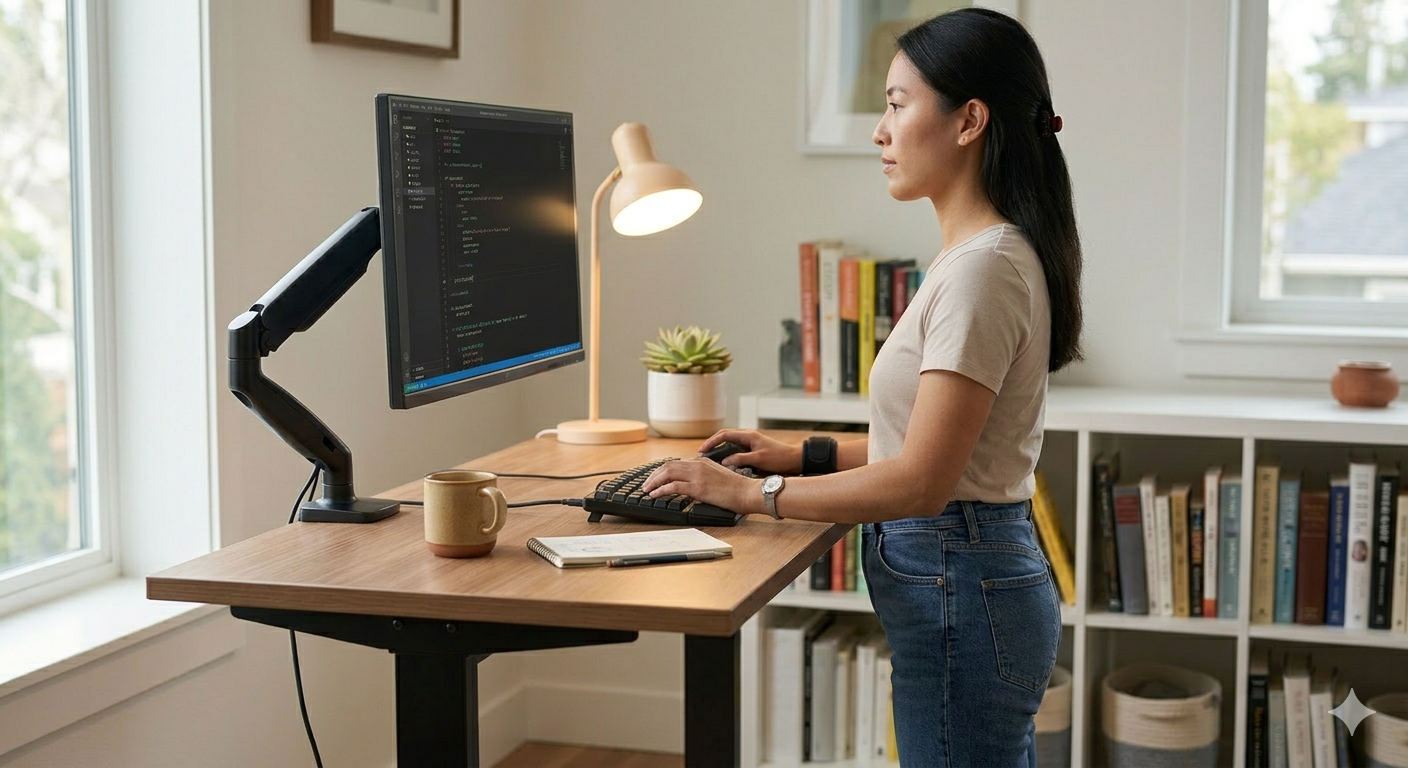
An electric sit-stand desk is ideal for alternating between positions. Standing all day creates its own problems — varicose veins, foot pain.
When standing:
- An anti-fatigue mat reduces ankle and knee stress
- Readjust monitor height for standing position (a monitor arm helps here)
- Shift your weight and move around rather than standing rigid
Quick Exercises
No gym time? These take seconds.
Neck stretches: Slowly turn your head left and right, then tilt your ear toward each shoulder. 15 seconds per direction.
Shoulder shrugs: Raise your shoulders to your ears, then drop them. 10 reps. Releases tension in the trapezius.
Cat-cow: On all fours, round your back up (cat), then let your belly drop while arching your back (cow). 10 reps. Good for lumbar flexibility.
Chair squats: Stand up from your chair and sit back down. Repeat. Engages the quads — your largest muscle group — and burns some calories.
Mental Health
Code isn't the only thing that matters. People do too.
Burnout
Burnout isn't just being tired. It's chronic workplace stress that leads to energy depletion, cynicism about work, and reduced effectiveness. The WHO classifies it as an occupational phenomenon.
Warning signs:
- Dreading Monday starting from Sunday evening
- Lost interest in coding
- Inability to focus, declining productivity
- Rest doesn't restore energy
Pushing through burnout just makes it worse. Taking time off, reducing scope, or changing your environment are active responses that actually help.
Isolation
Remote work has reduced casual human interaction. Some days, Slack messages are the only contact you have. The absence of small talk adds up to loneliness over time.
Developer communities, study groups, and in-person meetups help. They don't have to be technical. The point is being around other people.
Equipment Checklist
Spending money on health is an investment, not an expense. In priority order:
- Good chair — Foundation for back and neck health
- Monitor arm — Makes height adjustment effortless
- External keyboard and mouse — Laptop keyboards force bad posture. You need an external keyboard to position your screen at eye level
- Monitor — At least 24 inches. Lets you increase font size comfortably
- Sit-stand desk — Electric for easy transitions
Coding on a laptop alone is convenient but risky. Looking down at a laptop screen is a fast track to forward head posture. An external monitor at eye level plus an external keyboard benefits both your neck and your eyes.
The most important thing is awareness. Don't ignore what your body is telling you. If your neck is stiff, check your posture. If your hands tingle, adjust your keyboard. If your eyes are blurry, take a break. Code can wait until tomorrow. Your body can't be replaced.